
This page illustrates the discussion at https://wordpress.org/support/topic/recaptcha-is-not-being-displayed/ .
(28-Nov-2025. RESOLVED. See addition at the bottom of this page)
This is the simplest form created with WPForms Lite plugin. It contains one single-line text control, submit button and a captcha (Google reCaptcha v.2.0) between them. To my surprise the captcha is not being displayed. (However WPForms "knows" that captcha should be here so if user submits form it complains that captcha is not passed and invokes an error message).
Please, do not suggest to check whether my reCaptcha settings are correct or not. I am 100% sure that all captcha settings are correct because:
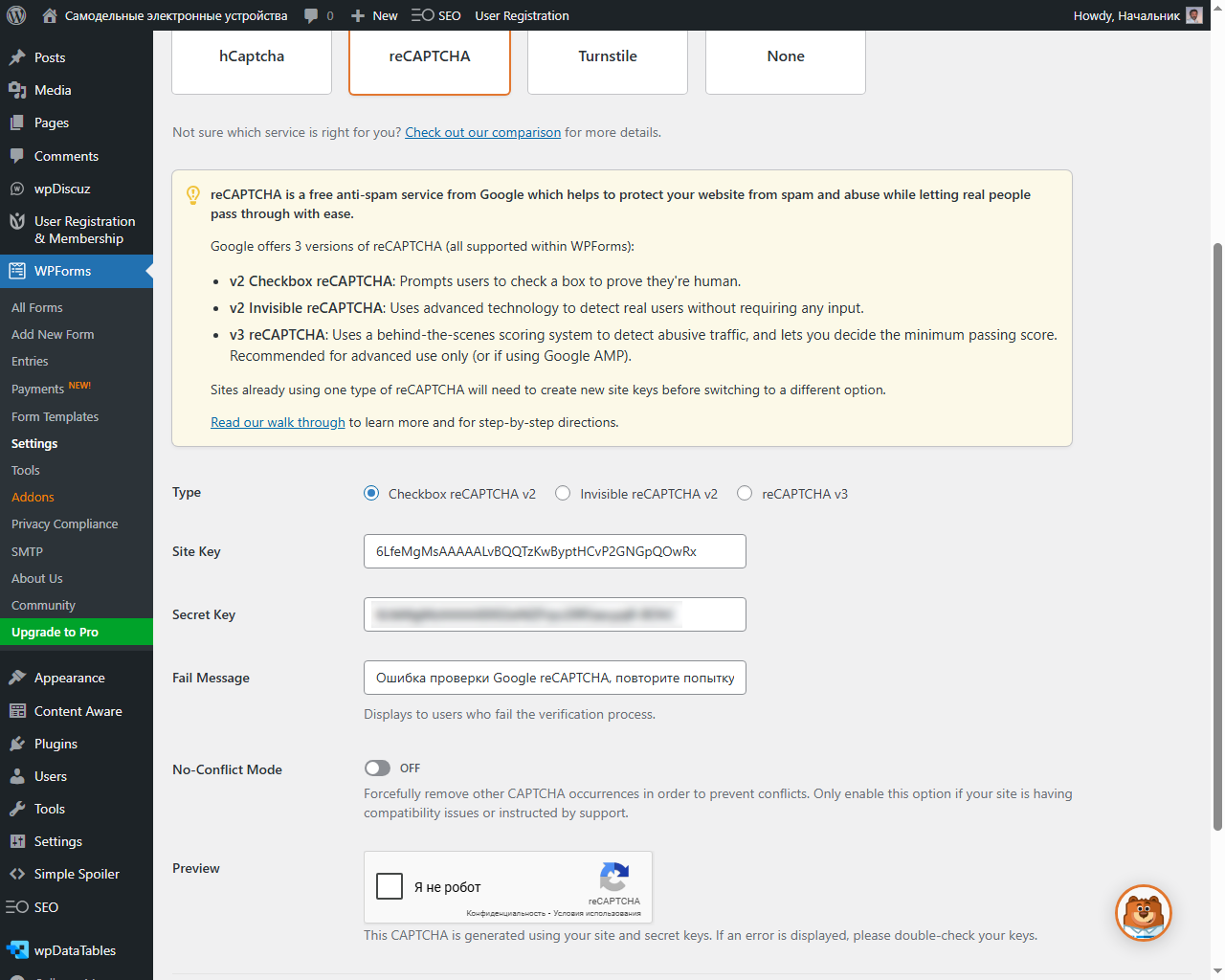
1. I can see captcha preview generated by Google using my site and secret keys at WPForms - Settings - CAPTCHA page. It means that my site key and secret key are OK so that Google accepts them.
2. For at least 2 years Google reCaptcha v.2 worked succesfully with WPForms plugin and with the same settings on other pages of this web site, for ex., on https://diy-electronic.ru/contacts/ but recently disappeared. It looks like it happened after one of the latest WPForms updates. That is why I had to disable reCaptcha on Contacts page and created this one to be able to make experiments here.
Looking at the page HTML I see following piece of code where presumably reCaptcha should be located:
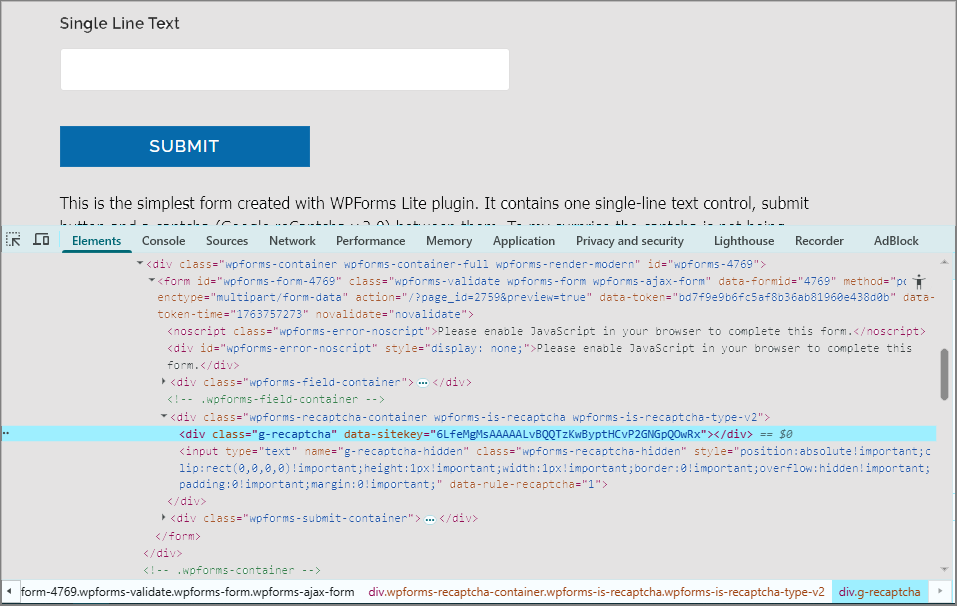
This div class="g-recaptcha" has a size of 750 (width ) by 0 (height) px with 10px margin at the top. I tried to increase height by applying corresponding style attributes but still nothing inside. Furtheremore, analyzing web requests sent by this page I don't see any requests to Google reCaptcha service.
What is wrong with my web site? Why does WPForms plugin stopped showing reCaptcha on my web site recently?
Alexander, webmaster
I added screenshot showing WPForms-Settings-CAPTCHA page from my web site (click to enlarge). Among other fields one can see reCaptcha preview generated by Google here. It means that the problem with reCaptcha is not related with my hosting provider limitations but most probably with the conflict between WPForms JS or CSS and other plugins. WordPress Admin's part (including WPForms admin pages) doesn't load various plugins when ordinary web site pages do load them and as a result we can see Google reCaptcha in Admin's page but can't see it in ordinary pages. Does it have sense?
Addition of 28-Nov-2025
I found out plugin conflicting with WPForms on this site. It is User Registration & Membership (URM) ( https://wordpress.org/plugins/user-registration/ ). Deactivating all plugins one-by-one I found out that as soon as I deactivate URM then the captcha appears in all my WPForm forms.
To resolve the conflict I installed Plugin Load Filter https://wordpress.org/plugins/plugin-load-filter/ , which gives a chance to deactivate unnecessary plugins on individual pages. It is very easy to use and it helped me to reach desired result within a few minutes. Disabling URM on all pages except for a few pages where I really need it, I succeeded to resolve the conflict with reCaptcha in my forms.